Pay in installments of $6.40 with
 ,
,
 and
and

Shipping Estimate
USA
- USA
- CAN
- USA
- CAN
Ships within 48 hours · Estimated delivery Jul 23 - Jul 28
 Promo Codes Available:
For Your Every Summer RSVP, with Code: SUMMER15
Description
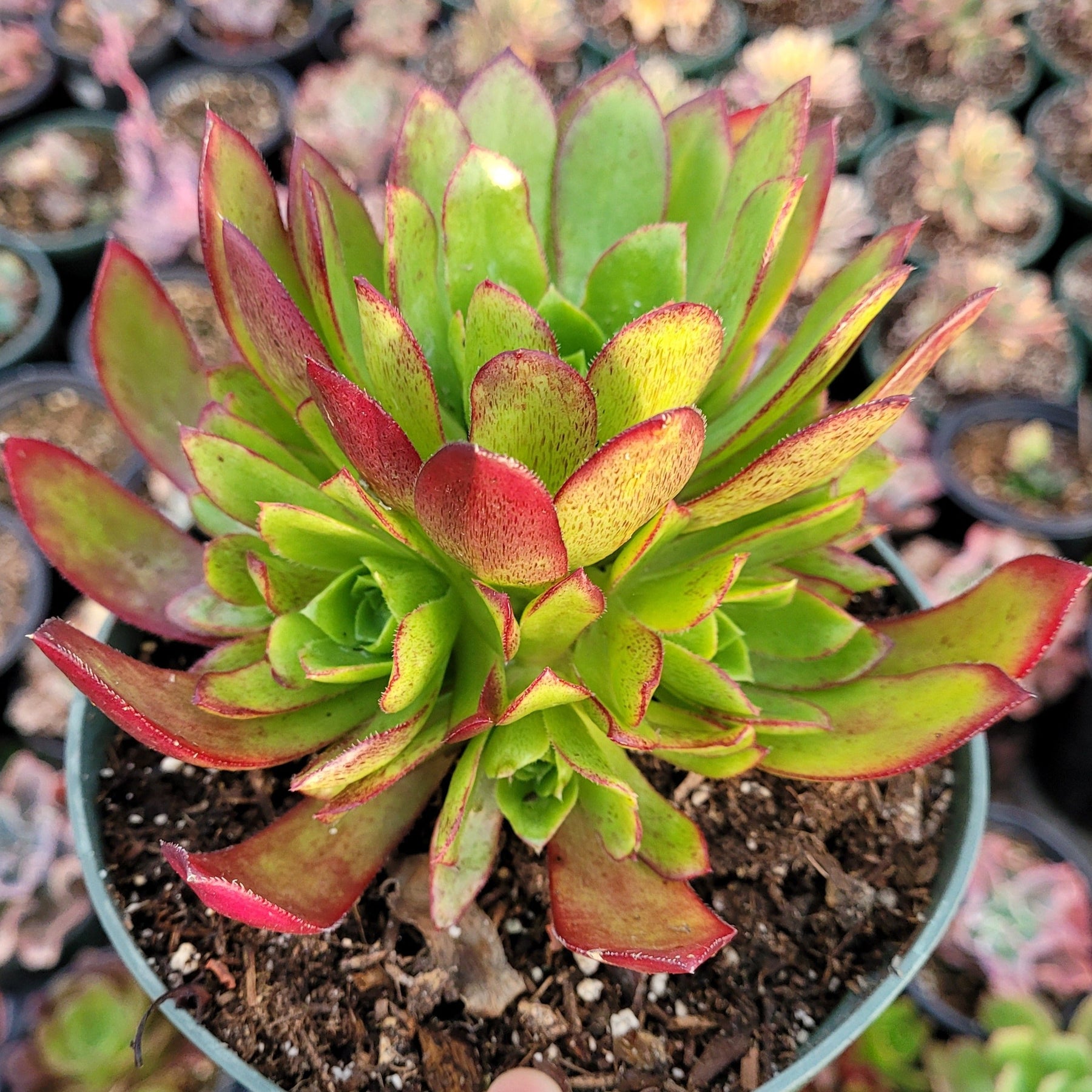
flame succulent Aeonium 'Phoenix Flame'Aeonium 'Phoenix Flame' is a cross between Aeonium arboreum 'Zwartkop' (a well known dark cultivar) and Aeonium simsii (a smaller Aeonium with lanceolate leaves) in the Crassulaceae family. Native to Gran Canaria Island in the Canary Islands, where it thrives at elevations up to 6000 feet. Its an evergreen clustering succulent with 3 4 inch wide dark reddish black rosettes with brilliant green centers made of lanceolate leaves with narrower tips and
Aeonium 'Phoenix Flame' is a cross between Aeonium arboreum 'Zwartkop' (a well-known dark cultivar) and Aeonium simsii (a smaller Aeonium with lanceolate leaves) in the Crassulaceae family. Native to Gran Canaria Island in the Canary Islands, where it thrives at elevations up to 6000 feet. It’s an evergreen clustering succulent with 3-4 inch wide dark reddish black rosettes with brilliant green centers made of lanceolate leaves with narrower tips and ciliate margins that creates a low mound to 6-12 inches tall.
Firecracker needs to be cared for in a well-lit environment so that its leaves turn deep purple-red while the middle part of the leaves wrap up while the surrounding leaves continue to spread out, just like an open peacock. Firecracker has striking dark foliage and is quite compact with a larger central rosette with numerous offsets forming a tidy, attractive plant. It’s a great plant for use as a groundcover or for a specimen in the garden or container.
Care Tips
Light: This plant needs plenty of sunlight, so it is best to have a well-lit and well-ventilated balcony to raise Firecracker indoors. The closed balcony method is not very easy to raise, and the closed environment is also easy to breed mealybugs.
Water: After summer dormancy, the Firecracker also needs shade and water control, watering frequency is adjusted to about once every 20 days and is watered at night when the temperature is relatively low. A drop along the edge of the pot is enough.
Soil: It is best to keep the Firecracker indoors with a slightly higher configuration of granular soil because indoor ventilation is not as easy as outdoor. After watering, it is not easy to dry quickly, so the soil with better water retention is more likely to appear as a waterlogged rotten phenomenon. You can follow the proportion of 60% of granular soil and 40% of peat soil, not easy to accumulate water and rotten roots can also control the shape.
Potting: It is recommended to use ceramic pots. Ceramic pots have a certain degree of permeability. Clay pots lose water too quickly, plastic pots tend to retain water for too long and permeability is poor.
Temperature: The optimal growing temperature is between 64-82°F (18-28°C). It’s a winter type succulent that can grow at a minimum of 28°F (-2°C) in winter, and it is best to keep the temperature at about 41°F (5°C) at this time of the year if the mage is to spend the winter peacefully. When the temperature is low, the succulent mage will enter a dormant period, so you don't need to water the plant too much and can stop fertilizing the plant at this stage.
Humidity: Firecracker grows well in average household humidity levels when grown indoors. It does not like too much humidity. Normal household humidity is good for this plant.
Shipping & Handling
- The 2 Inch Aeonium 'Firecracker' plants are shipped with the pot and soil
- The 4 Inch and larger plants are shipped bare roots without the pot and soil:
- We commit to shipping bare roots, which requires more time and labor, and provide excellent quality and service to our customers - see Benefits of Shipping Bare Roots
- You will receive a very similar plant to the one shown in the photos; shape and color may vary
- Ship within USA & its outlying territories only
- Please visit Order Processing & Shipping info page for additional details
Care Instructions
Please visit our Succulent Care info page for more details.
To ensure the health of succulents, it is important to plant them in porous, well-draining soil. Succulents require little watering, but don't like to sit in wet soil. To create an adequate cactus mix, simply add pumice, perlite, or grit to cactus soil to provide the proper drainage.
Make sure to leave drought periods between waterings to prevent the plant from water-logging.
Weather Conditions
- When ordering, be mindful that living succulents can be damaged by the cold weather.
- If you live in an area that is below 40 degrees Fahrenheit, please add a shipping warmer to your order or consider purchasing plant until the weather is more suitable.
- Shipping Warmer: 72+ Hours Heat Packs available for $1.7 each
Shipping Notes
- Free Standard Shipping on $100+ Orders to the USA.
- Except Preorder products are shipped in 48 hours.
- Delivery to the USA:
- Standard Shipping : 3-10 business days
- If time is of the essence, please consider selecting expedited delivery for faster service.
Exchange/Return Notes
- We offer a 30-day return/exchange service after receiving.
- Final sale items are not eligible for returns or exchanges.
- To process your return/exchange, please contact us at [email protected]
- Please click here for more details>>> Return & Exchange Policy